 Free
Starter🎁 Welcome Gift
Christmas Reindeer Nose Clicker Candy Box
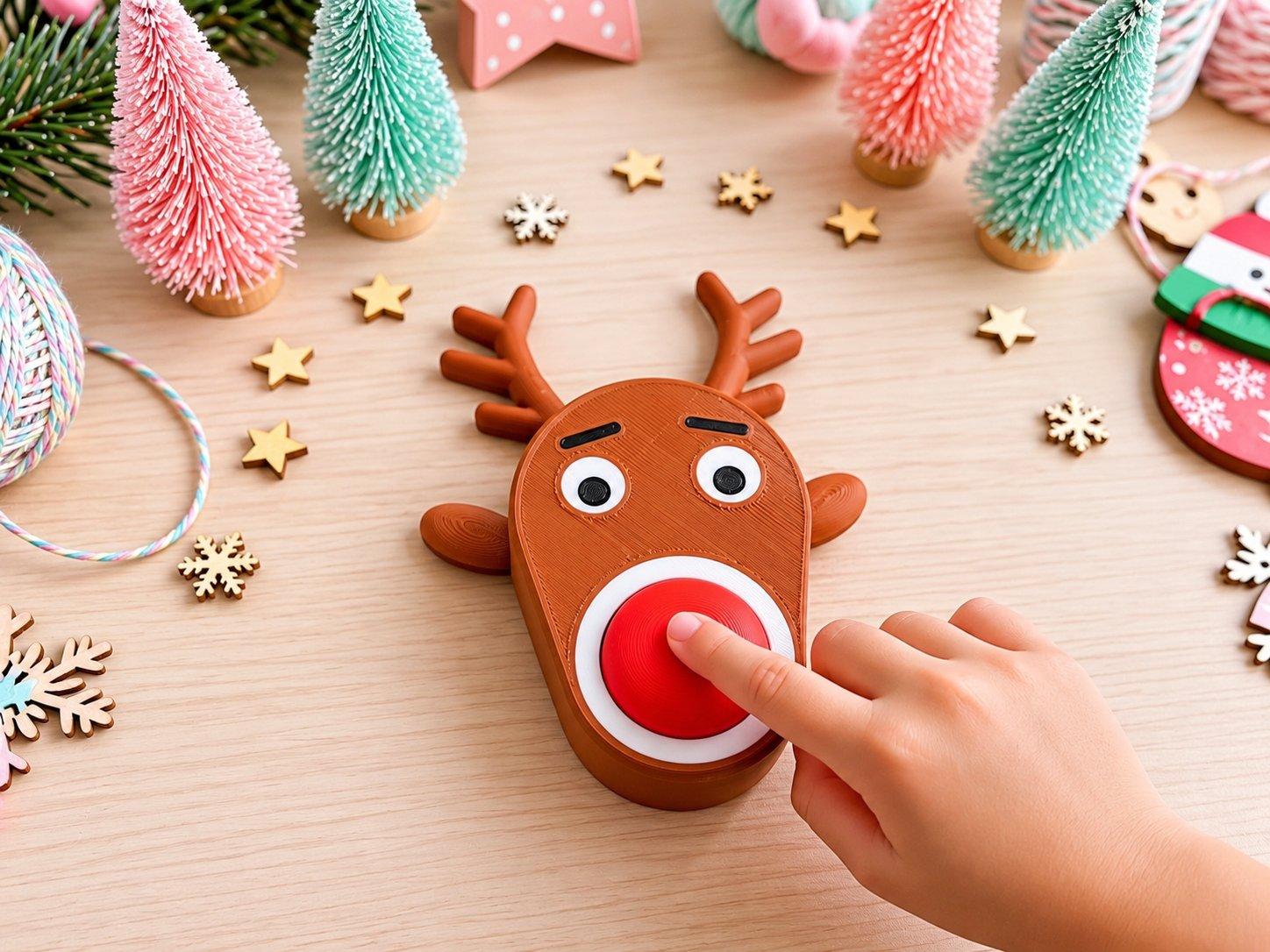
🦌 Press his red nose! 🔴 A cute Christmas clicker with hidden chocolate storage and a bag charm loop. Small in size, big in fun! 🎄🍬
Checking membership…
Starter model • Download with a paid membership • Personal use
Print Information
- Category
- Accessories
- Material
- PLA
- Nozzle
- 0.4 mm
- Layer Height
- 0.20 mm
- Supports
- No
- Infill
- 10%
- Difficulty
- Intermediate
- License
- PixelForm Free Personal
More Models
Free ⭐ Premium
 ⭐ Premium
Helpful Printing Guides
- Sanding and Painting PLA Prints: A Beginner's Finishing GuideSandpaper grits, filler primer, acrylic paints and clear coats — a simple workflow to turn layer lines into a smooth, painted finish.
- Are 3D Prints Food Safe? An Honest Guide for Candy Bowls and Kitchen ItemsWhat "food safe" really means for FDM prints, why layer lines matter, and practical ways to use printed bowls and kitchen items safely.
- Planning Halloween and Christmas 3D Prints: A Maker's TimelineHow far ahead to start, how to batch prints efficiently, and which seasonal projects suit beginners, gift-givers and small sellers.
Christmas
About This Model
Christmas Reindeer Nose Clicker & Candy Box
A Clickable Red Nose, Hidden Candy Storage, and an Adorable Christmas Bag Charm! 🦌🎄
Meet the newest little member of the PixelForm Studio Christmas collection!
This adorable reindeer is more than just a cute decoration. It combines a satisfying mechanical nose clicker, a small storage compartment, and a hanging loop into one charming, multifunctional 3D-printable design.
🔴 Interactive Red Nose Clicker
The reindeer's bright red nose is designed to work with a compatible mechanical keyboard switch. Press the nose to enjoy a satisfying click!
Perfect for anyone who enjoys small interactive desk accessories and mechanical fidget toys.
🍬 Hidden Chocolate Storage
Open the reindeer to reveal a small compartment designed for individually wrapped chocolates, miniature candies, or tiny keepsakes.
The compact compartment makes this reindeer a fun Christmas surprise or a creative little gift container.
Use only individually wrapped treats. Do not place unwrapped food directly against the printed plastic.
🎒 Keychain & Bag Charm
A built-in hanging loop allows you to attach the reindeer to a keyring, backpack, handbag, or Christmas gift package.
Carry your festive little companion wherever you go!
✨ Design Features
Adorable reindeer with decorative antlers
Clickable red nose with compatible mechanical switch
Small hidden compartment for wrapped chocolates
Built-in hanging loop
Separate body and multicolor face components
Four-color facial details
Two build plates for convenient printing
Perfect for festive gifts and seasonal accessories
🖨️ Printing Information
Plate 1: Brown reindeer body
Plate 2: Multicolor face, red nose, and details
Slicer reference: 0.4 mm nozzle, PLA filament.
Estimated total printing time: approximately 1 hour 53 minutes.
Total estimated filament consumption: approximately 43.74 g, including multicolor purge and tower material.
⚠️ Important Size Notice
THIS IS A SMALL MODEL!
The reindeer may appear much larger in promotional photographs than it actually is.
Please check the model dimensions and preview the parts in your slicer before printing. The candy compartment is intended for small individually wrapped treats, not large chocolates.
Mechanical switch, keyring, and chocolates are not included.
Designed with love by PixelForm Studio. ❤️
A tiny reindeer with three important Christmas jobs: clicking, carrying chocolates, and spreading smiles!
Printing Tips
- Print with the settings listed above.
How to Print Christmas Reindeer Nose Clicker Candy Box
Recommended print settings, explained
- Layer height (0.20 mm): 0.20 mm is the best balance of smooth curves and reasonable print time for most models. Use 0.16 mm for extra-smooth curved surfaces, or 0.24–0.28 mm for a quick draft.
- Infill (10%): Decorative prints need little infill. 10–15% gyroid keeps the model light and quick to print; extra walls add more strength than extra infill.
- Supports (No): This model is designed to print without supports. Keep supports switched off in your slicer: every overhang is shallow enough to print cleanly, and you save both filament and clean-up time.
- Walls: use at least 3 walls (perimeters) so the outer surface is solid and edges stay crisp after sanding.
Filament and material advice
PLA is listed for this model and is the easiest choice for decorative prints: it prints at 200–220°C with almost no warping, holds fine details and comes in the widest range of colors. Switch to PETG only if the print will sit in a hot car, in direct sun or outdoors.
Printing and post-processing tips
- Wash the build plate with warm water and dish soap before printing; fingerprints are the most common cause of parts lifting.
- A brim is only needed if corners start to lift; most models stick well on a clean textured or smooth PEI plate.
- Let the print cool fully before removing it, then trim any brim or strings with flush cutters.
- Light sanding (220, then 400 grit) smooths layer lines; a filler primer and acrylic paint give a fully finished look.
Frequently asked questions
- Can I scale this model?
- Yes. Scaling up is usually safe; when scaling down, check in the slicer preview that thin walls still have at least two line widths (about 0.8 mm with a 0.4 mm nozzle).
- Which printers can print it?
- Any FDM printer with a 0.4 mm nozzle and a build plate larger than the model. The settings on this page were chosen to work on common printers without special tuning.
- Can I sell prints of this model?
- Not under the default license, which covers printing for yourself, your household and gifts. To sell physical prints, contact PixelForm first for written permission. Sharing or reselling the digital files is never allowed.
- Is it food safe?
- Printed plastic has small grooves between layers that are hard to clean. Use it for wrapped treats, or put a liner or small dish inside for loose food.
More detail in our printing guides and the license terms.
Looking for something specific?
Browse the full library, or tell us what you'd like to print next.
Comments
Log in or join free to leave a comment.