 ⭐ Premium
Cute Santa Claus Christmas Lollipop Holder | Festive Candy Display & Holiday Tab
🎅🍭 Make Christmas sweeter! Print this adorable Santa Lollipop Holder and create a magical holiday candy display! 🎄❤️
Checking membership…
Premium model • Download with a paid membership • Personal use
Print Information
- Category
- Organization
- Material
- PLA
- Nozzle
- 0.4 mm
- Layer Height
- 0.20 mm
- Supports
- No
- Infill
- 10%
- Difficulty
- Intermediate
- License
- PixelForm Free Personal
More Models
⭐ Premium Starter
 Free
Helpful Printing Guides
- Planning Halloween and Christmas 3D Prints: A Maker's TimelineHow far ahead to start, how to batch prints efficiently, and which seasonal projects suit beginners, gift-givers and small sellers.
- Sanding and Painting PLA Prints: A Beginner's Finishing GuideSandpaper grits, filler primer, acrylic paints and clear coats — a simple workflow to turn layer lines into a smooth, painted finish.
- Are 3D Prints Food Safe? An Honest Guide for Candy Bowls and Kitchen ItemsWhat "food safe" really means for FDM prints, why layer lines matter, and practical ways to use printed bowls and kitchen items safely.
Christmas
About This Model
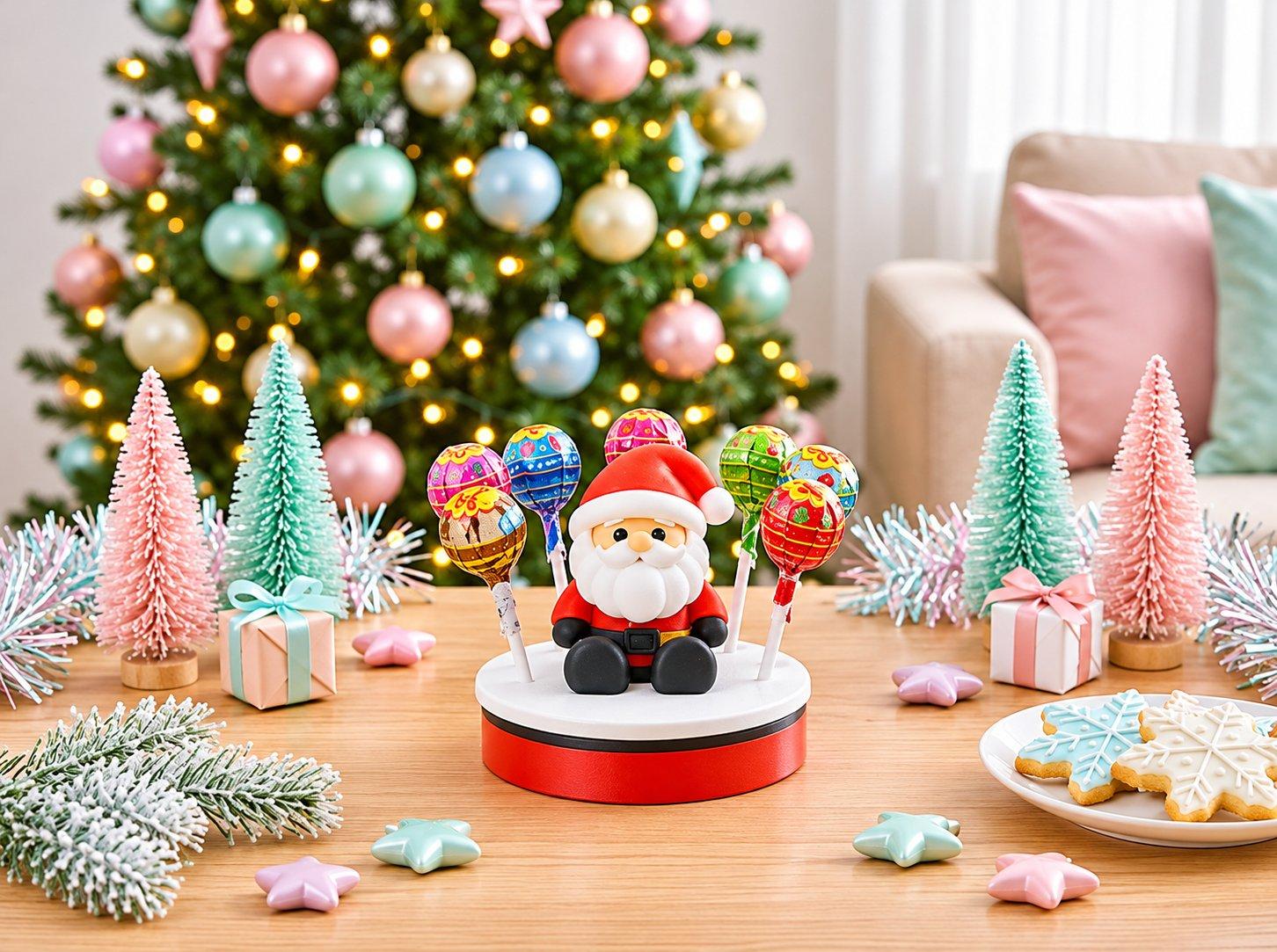
🎅🍭 Santa Claus Christmas Lollipop Holder – A Sweet Holiday Decoration!
Make your Christmas celebrations even sweeter with this adorable Santa Claus Christmas Lollipop Holder, lovingly designed by PixelForm Studio! ❤️
Featuring a cheerful Santa Claus sitting on a festive circular platform, this charming 3D-printable creation combines holiday decoration with a practical lollipop display.
Santa wears his traditional red Christmas outfit, fluffy white beard, matching hat, and cute black boots. The round red-and-white base includes multiple holes where you can arrange individually wrapped lollipops to create a colorful Christmas display.
🎄 FEATURES
🎅 Cute Santa Claus centerpiece with charming details
🍭 Multiple holes for displaying lollipops
🎁 Perfect for holiday parties and Christmas gift displays
❤️ Beautiful red, white, black, and skin-tone color combination
🏠 Suitable for desks, shelves, and Christmas table decorations
🖨️ Designed for multicolor PLA 3D printing
✨ WHY YOU'LL LOVE IT
This adorable Santa holder transforms ordinary wrapped lollipops into a festive holiday presentation!
Place it beside your Christmas tree, on a party table, or at a holiday gift station to add a cheerful seasonal touch.
It also makes a fun 3D printing project for makers who enjoy creating Christmas decorations.
🖨️ PRINTING INFORMATION
Tested slicer configuration:
• Anycubic Kobra 4
• 0.4 mm nozzle
• 0.20 mm layer height
• PLA filament
• Four colors
• Tree supports enabled
Estimated printing time: 11 hours 24 minutes
Estimated total filament consumption: 195.35 g, including supports, flushing, and prime tower.
Actual printing results may vary depending on printer and settings.
📌 IMPORTANT NOTES
• Lollipops are not included.
• Check lollipop stick dimensions before use.
• Use individually wrapped candy only.
• This is a decorative holder, not a food-contact container.
• Remove supports carefully after printing.
• Review the sliced model before starting.
🎄 Add a little sweetness and Christmas magic to your holiday celebrations!
Created with love by PixelForm Studio. ❤️
Printing Tips
- Print with the settings listed above.
How to Print Cute Santa Claus Christmas Lollipop Holder | Festive Candy Display & Holiday Tab
Recommended print settings, explained
- Layer height (0.20 mm): 0.20 mm is the best balance of smooth curves and reasonable print time for most models. Use 0.16 mm for extra-smooth curved surfaces, or 0.24–0.28 mm for a quick draft.
- Infill (10%): This piece takes some load, so strength comes mostly from walls rather than infill. Use 3–4 walls and 15–25% gyroid or grid infill.
- Supports (No): This model is designed to print without supports. Keep supports switched off in your slicer: every overhang is shallow enough to print cleanly, and you save both filament and clean-up time.
- Walls: use at least 3 walls (perimeters) so the outer surface is solid and edges stay crisp after sanding.
Filament and material advice
PLA is listed for this model. PLA gives the crispest details and brightest colors; for a piece that is carried, pulled or worn every day, PETG lasts longer because it bends slightly instead of snapping.
Printing and post-processing tips
- Wash the build plate with warm water and dish soap before printing; fingerprints are the most common cause of parts lifting.
- A brim is only needed if corners start to lift; most models stick well on a clean textured or smooth PEI plate.
- Let the print cool fully before removing it, then trim any brim or strings with flush cutters.
- Light sanding (220, then 400 grit) smooths layer lines; a filler primer and acrylic paint give a fully finished look.
Frequently asked questions
- Can I scale this model?
- Yes. Scaling up is usually safe; when scaling down, check in the slicer preview that thin walls still have at least two line widths (about 0.8 mm with a 0.4 mm nozzle).
- Which printers can print it?
- Any FDM printer with a 0.4 mm nozzle and a build plate larger than the model. The settings on this page were chosen to work on common printers without special tuning.
- Can I sell prints of this model?
- Not under the default license, which covers printing for yourself, your household and gifts. To sell physical prints, contact PixelForm first for written permission. Sharing or reselling the digital files is never allowed.
- Is it food safe?
- Printed plastic has small grooves between layers that are hard to clean. Use it for wrapped treats, or put a liner or small dish inside for loose food.
More detail in our printing guides and the license terms.
Looking for something specific?
Browse the full library, or tell us what you'd like to print next.
Comments
Log in or join free to leave a comment.