 ⭐ Premium
Starter🎁 Welcome Gift
Enchanted Pinecone Fairy House – Woodland LED Tealight Cottage | Autumn Fantasy
🌲🍄 A magical pinecone fairy house with glowing star windows! Add a cozy woodland charm to your home with an LED tealight. ✨
Checking membership…
Starter model • Download with a paid membership • Personal use
Print Information
- Category
- Decor
- Material
- PLA
- Nozzle
- 0.4 mm
- Layer Height
- 0.20 mm
- Supports
- No
- Infill
- 10%
- Difficulty
- Intermediate
- License
- PixelForm Free Personal
More Models
⭐ Premium Starter
 Free
Helpful Printing Guides
- How to 3D Print Name Keychains That Look Sharp and LastLetter height, font weight, ring-hole strength and print orientation — everything that decides whether a name keychain looks crisp or snaps on day two.
- Multi-Colour Prints on a Single Nozzle: Colour Changes by LayerHow to add a filament change at a specific layer in common slicers, choose the right layer, and avoid tinted or misaligned colours.
- How to Use the PixelForm Customizer: Personalize a Model Step by StepFrom choosing a model to a printable STL — how the browser customizer works, what each setting does, and how to fix a model that will not generate.
Thanksgiving
About This Model
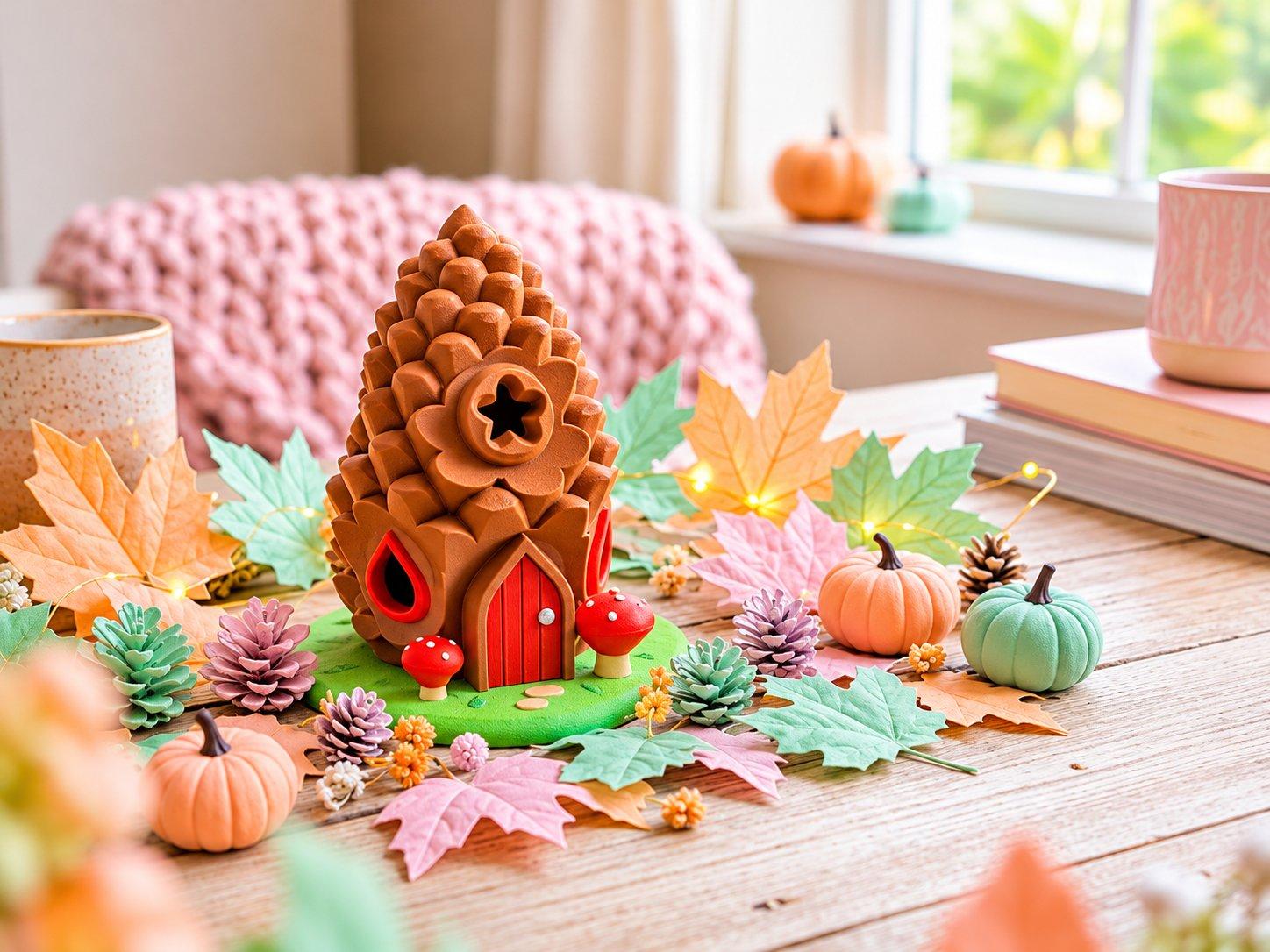
🌲 Enchanted Pinecone Fairy House – A Little Home Full of Woodland Magic! 🍄✨
Deep inside an enchanted forest, surrounded by colorful autumn leaves and tiny mushrooms, stands a magical little cottage shaped like a pinecone.
Welcome to the Enchanted Pinecone Fairy House, a whimsical 3D-printable decoration designed to bring warmth, imagination, and a little fairy-tale magic into your home.
🏡 A Charming Woodland Design
Inspired by nature, this miniature cottage features a beautifully textured pinecone-shaped exterior, a delicate star-shaped window, a charming red front door, decorative side windows, and adorable spotted mushrooms resting on a grassy green base.
Every detail creates the feeling of a tiny secret home hidden among the trees.
✨ A Magical Glow
The underside includes an opening for placing a small battery-operated LED tealight inside the cottage.
When illuminated, the star-shaped window and decorative openings create a warm, magical atmosphere.
Display it on a shelf, beside your favorite books, or as part of an autumn centerpiece.
🍂 Perfect For:
• Autumn and fall home decorations
• Fairy gardens and fantasy-themed displays
• Cozy bedroom and living room shelves
• Woodland-inspired seasonal decorations
• Miniature house collections
• Handmade gifts for fairy-tale lovers
• Decorative LED tealight displays
• Charming desktop decorations
🖨️ 3D Printing Information
The model is designed for multicolor PLA printing and includes several decorative colors to bring the woodland scene to life.
Reference slicer settings:
• Printer: Anycubic Kobra 4
• Nozzle: 0.4 mm
• Layer height: 0.20 mm
• Material: PLA
• Estimated printing time: 14 hours 51 minutes
• Estimated total filament: 246.73 g
• Filament changes: 358
These estimates are based on the reference slicer preview and may vary depending on your printer, filament, and settings.
💡 Important Safety Information
Use only a battery-operated LED tealight. Never insert a real candle or expose the PLA model to an open flame or excessive heat. Check the LED candle's dimensions before printing.
🌟 A Little Forest Story
Perhaps a tiny fairy lives inside, watching the stars through the window while the forest sleeps.
Bring this magical little woodland cottage to life with your 3D printer!
Designed with love by PixelForm Studio. ❤️
Printing Tips
- Print with the settings listed above.
How to Print Enchanted Pinecone Fairy House – Woodland LED Tealight Cottage | Autumn Fantasy
Recommended print settings, explained
- Layer height (0.20 mm): 0.20 mm is the best balance of smooth curves and reasonable print time for most models. Use 0.16 mm for extra-smooth curved surfaces, or 0.24–0.28 mm for a quick draft.
- Infill (10%): This piece takes some load, so strength comes mostly from walls rather than infill. Use 3–4 walls and 15–25% gyroid or grid infill.
- Supports (No): This model is designed to print without supports. Keep supports switched off in your slicer: every overhang is shallow enough to print cleanly, and you save both filament and clean-up time.
- Walls: use at least 3 walls (perimeters) so the outer surface is solid and edges stay crisp after sanding.
Filament and material advice
PLA is listed for this model. PLA gives the crispest details and brightest colors; for a piece that is carried, pulled or worn every day, PETG lasts longer because it bends slightly instead of snapping.
Printing and post-processing tips
- Wash the build plate with warm water and dish soap before printing; fingerprints are the most common cause of parts lifting.
- A brim is only needed if corners start to lift; most models stick well on a clean textured or smooth PEI plate.
- Let the print cool fully before removing it, then trim any brim or strings with flush cutters.
- Light sanding (220, then 400 grit) smooths layer lines; a filler primer and acrylic paint give a fully finished look.
Frequently asked questions
- Can I scale this model?
- Yes. Scaling up is usually safe; when scaling down, check in the slicer preview that thin walls still have at least two line widths (about 0.8 mm with a 0.4 mm nozzle).
- Which printers can print it?
- Any FDM printer with a 0.4 mm nozzle and a build plate larger than the model. The settings on this page were chosen to work on common printers without special tuning.
- Can I sell prints of this model?
- Not under the default license, which covers printing for yourself, your household and gifts. To sell physical prints, contact PixelForm first for written permission. Sharing or reselling the digital files is never allowed.
More detail in our printing guides and the license terms.
Looking for something specific?
Browse the full library, or tell us what you'd like to print next.
Comments
Log in or join free to leave a comment.