 Free
Starter🎁 Welcome Gift
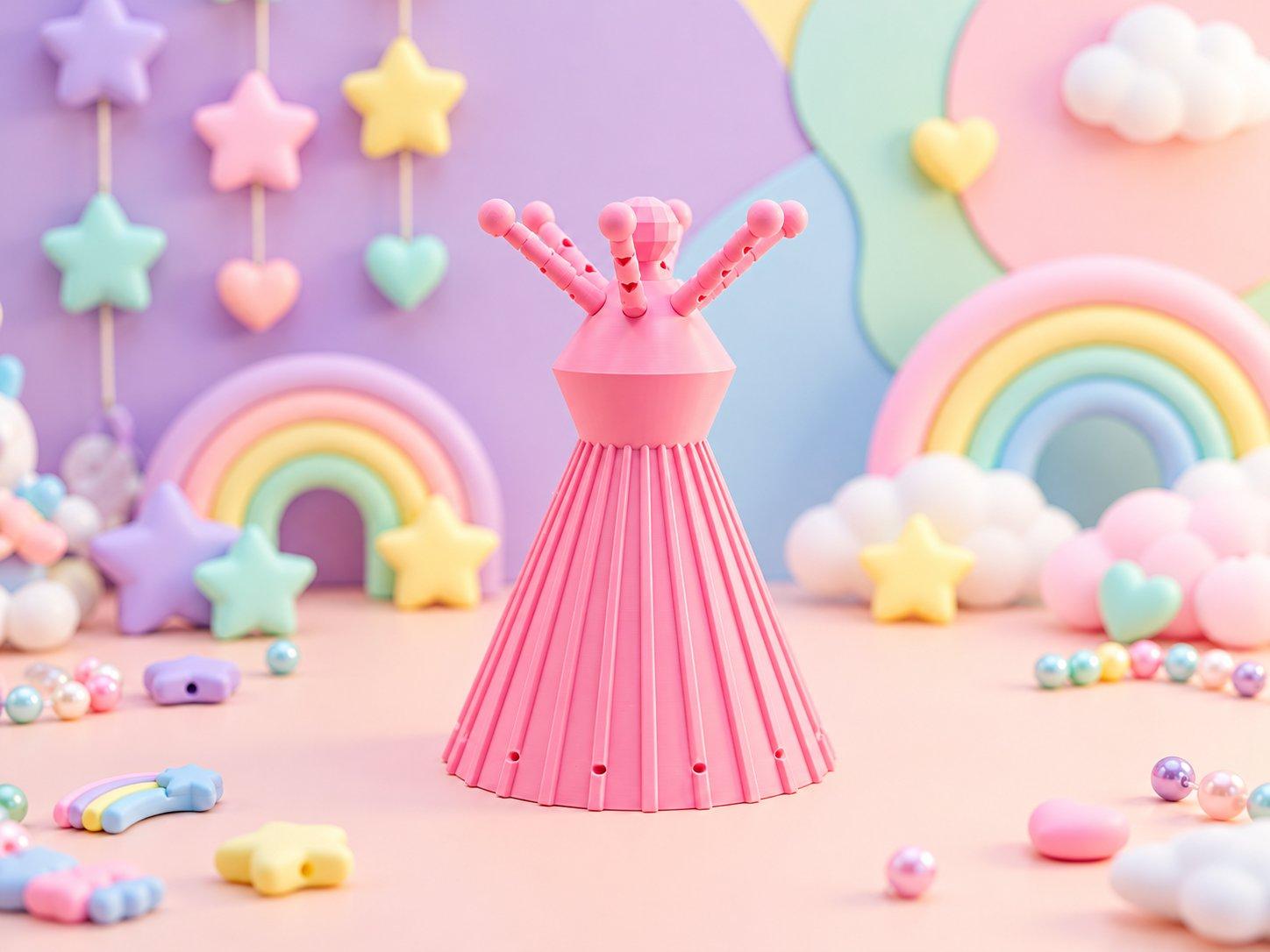
Princess Dress Earring Jewelry Organizer Elegant Vanity Display
A princess-inspired jewelry organizer! Display your favorite earrings in style with this elegant 3D printable vanity accessory. 💗
Checking membership…
Starter model • Download with a paid membership • Personal use
Print Information
- Category
- Organization
- Material
- PLA
- Nozzle
- 0.4 mm
- Layer Height
- 0.20 mm
- Supports
- No
- Infill
- 10%
- Difficulty
- Easy Print
- License
- PixelForm Free Personal
More Models
Free ⭐ Premium
 ⭐ Premium
Helpful Printing Guides
- Printing Earrings and Small Jewelry: Lightweight, Clean and ComfortableHow to print tiny jewelry pieces cleanly, keep them light enough to wear, attach hooks and jump rings, and finish edges so they feel good on skin.
- Multi-Colour Prints on a Single Nozzle: Colour Changes by LayerHow to add a filament change at a specific layer in common slicers, choose the right layer, and avoid tinted or misaligned colours.
- Printing Strong Wall Hooks and Key Holders That Don't SnapOrientation, walls, material and mounting — how to print wall-mounted hooks and key holders that hold up to daily use.
All Year Round
About This Model
Bring elegance, creativity, and organization to your jewelry collection with the Princess Dress Earring & Jewelry Organizer
Inspired by the graceful silhouette of a princess gown, this beautiful 3D printable organizer transforms everyday jewelry storage into a charming decorative display.
Its pleated skirt-shaped base creates a stylish foundation, while the upper section features multiple branching arms with rounded tips and small openings for displaying earrings and lightweight accessories.
Whether placed on a bedroom dresser, vanity table, or decorative shelf, this organizer adds a soft and feminine touch to your space.
Design Features
Elegant Dress-Inspired Shape
The flowing pleated skirt design creates a graceful silhouette that looks beautiful even when no jewelry is displayed.
Multiple Jewelry Holders
The branching upper structure provides convenient hanging positions for dangling earrings and other compatible lightweight jewelry.
Decorative and Functional
More than an ordinary jewelry stand, this model combines practical organization with a unique decorative appearance.
Perfect for Gifting
A thoughtful 3D printed gift for jewelry lovers, birthdays, special celebrations, or anyone who enjoys beautiful vanity accessories.
Recommended Printing Information
Material: PLA or PLA Matte
Nozzle: 0.4 mm
Layer Height: 0.20 mm
Supports: Required
Recommended Support: Tree (Auto)
Tested Filament Consumption: 97.38 g including supports
Printing Recommendations
Print the model upright using appropriate tree supports beneath the extended branches. Carefully remove supports after cooling, especially around the smaller decorative details and jewelry openings.
For best results, use a well-calibrated printer and check the sliced preview before printing.
Please note that this organizer is intended for lightweight jewelry and decorative use. Avoid placing heavy accessories on the branches.
Designed with creativity and care by PixelForm Studio.
Printing Tips
- Print with the settings listed above.
How to Print Princess Dress Earring Jewelry Organizer Elegant Vanity Display
Recommended print settings, explained
- Layer height (0.20 mm): Small details and lettering benefit from finer layers. If faces or text look soft at 0.20 mm, try 0.16 mm before going lower — it adds only about a quarter more print time.
- Infill (10%): This piece takes some load, so strength comes mostly from walls rather than infill. Use 3–4 walls and 15–25% gyroid or grid infill.
- Supports (No): This model is designed to print without supports. Keep supports switched off in your slicer: every overhang is shallow enough to print cleanly, and you save both filament and clean-up time.
- Walls: use at least 3 walls (perimeters) so the outer surface is solid and edges stay crisp after sanding.
Filament and material advice
PLA is listed for this model. PLA gives the crispest details and brightest colors; for a piece that is carried, pulled or worn every day, PETG lasts longer because it bends slightly instead of snapping.
Printing and post-processing tips
- Wash the build plate with warm water and dish soap before printing; fingerprints are the most common cause of parts lifting.
- Add a 3–5 mm brim so small parts stay put, and set a minimum layer time of about 8 seconds so tiny layers can cool.
- Let the print cool fully before removing it, then trim any brim or strings with flush cutters.
- Light sanding (220, then 400 grit) smooths layer lines; a filler primer and acrylic paint give a fully finished look.
Frequently asked questions
- Can I scale this model?
- Yes. Scaling up is usually safe; when scaling down, check in the slicer preview that thin walls still have at least two line widths (about 0.8 mm with a 0.4 mm nozzle).
- Which printers can print it?
- Any FDM printer with a 0.4 mm nozzle and a build plate larger than the model. The settings on this page were chosen to work on common printers without special tuning.
- Can I sell prints of this model?
- Not under the default license, which covers printing for yourself, your household and gifts. To sell physical prints, contact PixelForm first for written permission. Sharing or reselling the digital files is never allowed.
More detail in our printing guides and the license terms.
Looking for something specific?
Browse the full library, or tell us what you'd like to print next.
Comments
Log in or join free to leave a comment.