 Free
Starter🎁 Welcome Gift
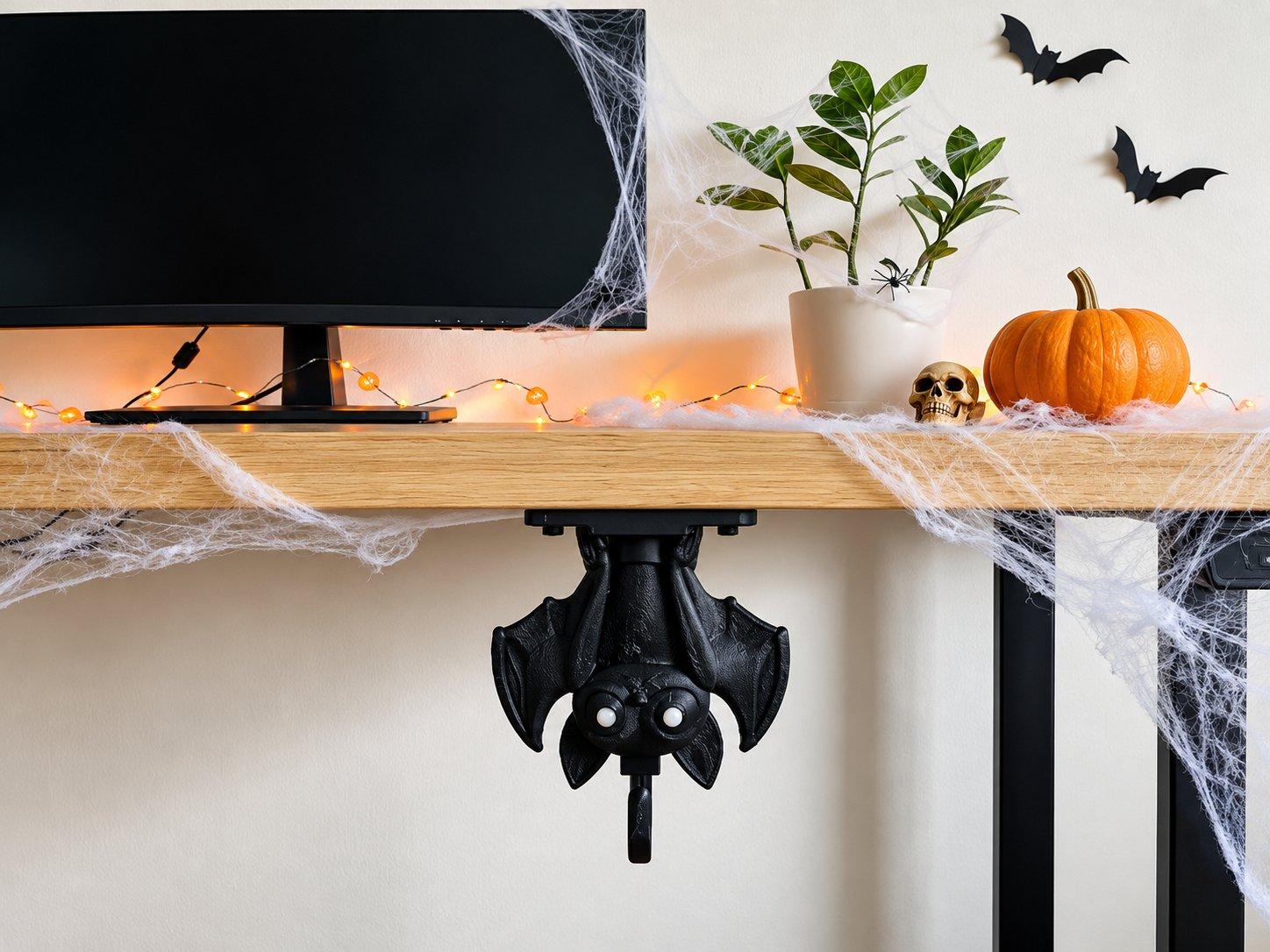
Spooky Bat Under Desk Headphone Hanger
🦇 Spooky meets practical! Hang your headphones beneath your desk with this adorable bat hook. Perfect for Halloween and gaming setups! 🎧
Checking membership…
Starter model • Download with a paid membership • Personal use
Print Information
- Category
- Organization
- Material
- PLA
- Nozzle
- 0.4 mm
- Layer Height
- 0.20 mm
- Supports
- Yes
- Infill
- 10%
- Difficulty
- Easy Print
- License
- PixelForm Free Personal
More Models
Free ⭐ Premium
 ⭐ Premium
Helpful Printing Guides
- Planning Halloween and Christmas 3D Prints: A Maker's TimelineHow far ahead to start, how to batch prints efficiently, and which seasonal projects suit beginners, gift-givers and small sellers.
- Sanding and Painting PLA Prints: A Beginner's Finishing GuideSandpaper grits, filler primer, acrylic paints and clear coats — a simple workflow to turn layer lines into a smooth, painted finish.
- Printing Strong Wall Hooks and Key Holders That Don't SnapOrientation, walls, material and mounting — how to print wall-mounted hooks and key holders that hold up to daily use.
Halloween
About This Model
🦇 Spooky Bat Under-Desk Headphone Hanger
Bring a little Halloween magic to your workspace with this adorable and functional Spooky Bat Under-Desk Headphone Hanger!
Who says desk organization has to be boring? This charming upside-down bat combines spooky Halloween style with practical everyday storage. With its beautifully detailed wings, cute white eyes, and curved hanging hook, this little creature is ready to guard your favorite headphones while keeping your desk neat and organized.
Perfect for gaming setups, home offices, creative workspaces, and anyone who loves gothic-inspired accessories!
✨ DESIGN FEATURES
🦇 Adorable Upside-Down Bat
A playful hanging bat with beautifully textured wings, expressive eyes, and charming spooky details.
🎧 Functional Headphone Hook
The curved hook provides a convenient place to hang your headphones beneath your desk, helping free up valuable desktop space.
🔩 Two-Hole Mounting Plate
The integrated flat mounting plate features two holes for secure installation using suitable screws or nails. Mounting hardware is not included.
🎃 Halloween-Inspired Design
A fun combination of cute and spooky, perfect for seasonal decorations or year-round gothic gaming setups.
🖤 Two-Color Appearance
🖨️ RECOMMENDED PRINT SETTINGS
Material: PLA
Nozzle: 0.4 mm
Layer Height: 0.20 mm
Supports: Tree (Auto)
Support Angle: 30°
Colors: Black and White
Estimated Filament: 39.55 g
Actual results may vary depending on your printer and settings.
🔧 INSTALLATION
Choose a suitable location underneath your desk.
Align the two mounting holes with the installation surface.
Secure the hanger using appropriate mounting hardware.
Check stability before hanging your headphones.
Avoid excessive loads and ensure the mounting surface is strong enough.
📸 REAL PRINTED MODEL
Please refer to our actual printed photos and Bambu Studio screenshots to see the finished design, surface details, and printing configuration.
Designed with creativity and care by PixelForm Studio. 🦇🖤
Printing Tips
- Print with the settings listed above.
How to Print Spooky Bat Under Desk Headphone Hanger
Recommended print settings, explained
- Layer height (0.20 mm): 0.20 mm is the best balance of smooth curves and reasonable print time for most models. Use 0.16 mm for extra-smooth curved surfaces, or 0.24–0.28 mm for a quick draft.
- Infill (10%): Decorative prints need little infill. 10–15% gyroid keeps the model light and quick to print; extra walls add more strength than extra infill.
- Supports (Yes): This model needs supports for some overhangs. Tree (organic) supports usually leave the cleanest surfaces; check the slicer preview before printing and remove supports slowly with flush cutters once the print has cooled.
- Walls: use at least 3 walls (perimeters) so the outer surface is solid and edges stay crisp after sanding.
Filament and material advice
PLA is listed for this model and is the easiest choice for decorative prints: it prints at 200–220°C with almost no warping, holds fine details and comes in the widest range of colors. Switch to PETG only if the print will sit in a hot car, in direct sun or outdoors.
Printing and post-processing tips
- Wash the build plate with warm water and dish soap before printing; fingerprints are the most common cause of parts lifting.
- A brim is only needed if corners start to lift; most models stick well on a clean textured or smooth PEI plate.
- Let the print cool fully before removing it, then trim any brim or strings with flush cutters.
- Light sanding (220, then 400 grit) smooths layer lines; a filler primer and acrylic paint give a fully finished look.
Frequently asked questions
- Can I scale this model?
- Yes. Scaling up is usually safe; when scaling down, check in the slicer preview that thin walls still have at least two line widths (about 0.8 mm with a 0.4 mm nozzle).
- Which printers can print it?
- Any FDM printer with a 0.4 mm nozzle and a build plate larger than the model. The settings on this page were chosen to work on common printers without special tuning.
- Can I sell prints of this model?
- Not under the default license, which covers printing for yourself, your household and gifts. To sell physical prints, contact PixelForm first for written permission. Sharing or reselling the digital files is never allowed.
More detail in our printing guides and the license terms.
Looking for something specific?
Browse the full library, or tell us what you'd like to print next.
Comments
Log in or join free to leave a comment.